
Pimmix 3.1
 20-11-2026
 Reading time 5 minutes
Smarter product data management, smoother everyday workflows
Pimmix 3.1 brings new capabilities and improvements designed to make everyday product data management easier, faster and more flexible. From enhanced logistics management and richer product content to improved AI workflows and performance, this update helps you work more efficiently with even the largest product assortments.
Logistics – Clearer, more complete and easier to manage
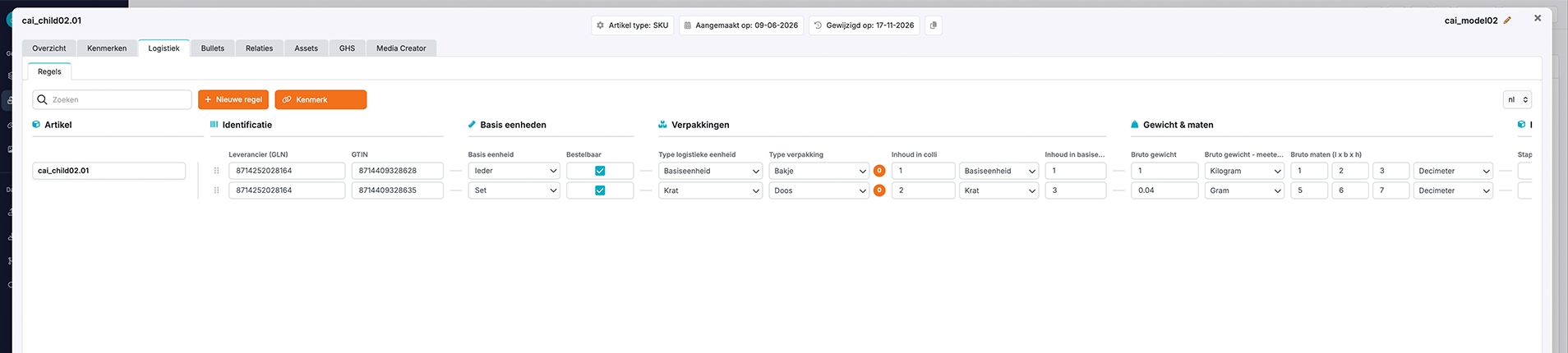
Expanded logistics data structure aligned with industry standards
We've expanded the logistics data structure to better support modern product information requirements, using internationally recognized standards such as GS1 as a reference.
The updated structure includes additional logistics and packaging-related fields, making it easier to maintain more comprehensive and consistent information across your product assortment.
These improvements help companies organize their logistics data more effectively and prepare product information for use across different systems, trading partners and distribution channels.
By managing logistics information alongside other product data in Pimmix, you can keep everything centralized, improve data consistency and reduce the need to maintain separate datasets.
What's improved?
-
A clearer and more structured logistics interface.
-
Expanded and improved logistics data fields.
-
Additional validation rules and immediate feedback on incorrect values.
-
More consistent management of logistics information across your product assortment.
Export logistics information directly from article overviews
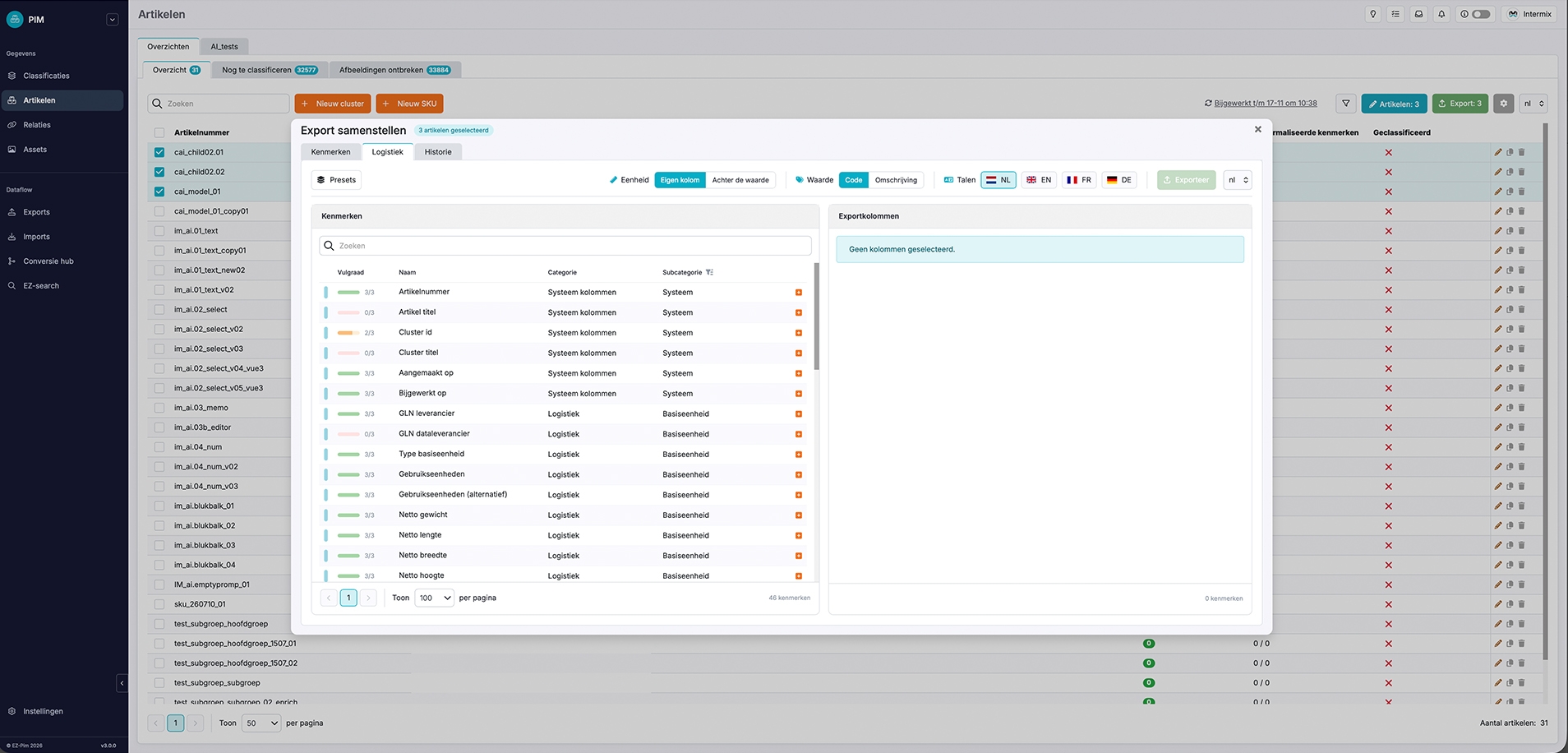
Logistics information can now be exported directly from the article overview, giving you more flexibility when preparing data for external systems, partners or further processing.
Simply select the articles you want to export and open the Export function. You'll now find a dedicated Logistics tab where you can choose which logistics fields to include. Pimmix then combines the selected articles and fields into a single export file.
This is especially useful when you need to share specific logistics information without exporting the entire product dataset or manually assembling the information in spreadsheets.
Product bullets – More flexible and richer product content
Go beyond simple bullet-point titles
Product bullets are a convenient way to manage structured product highlights, features, benefits and other reusable content. With Pimmix 3.1, we've significantly expanded the information that can be stored within an individual product bullet.
Previously, bullets were limited to a title. You can now use four different fields:
-
Code: A structured identifier for the bullet.
-
Title: The main heading or short statement.
-
Description: Additional information or a more detailed explanation.
-
Image: A visual element associated with the bullet.
These additional fields open up new possibilities for organizing and presenting product information.
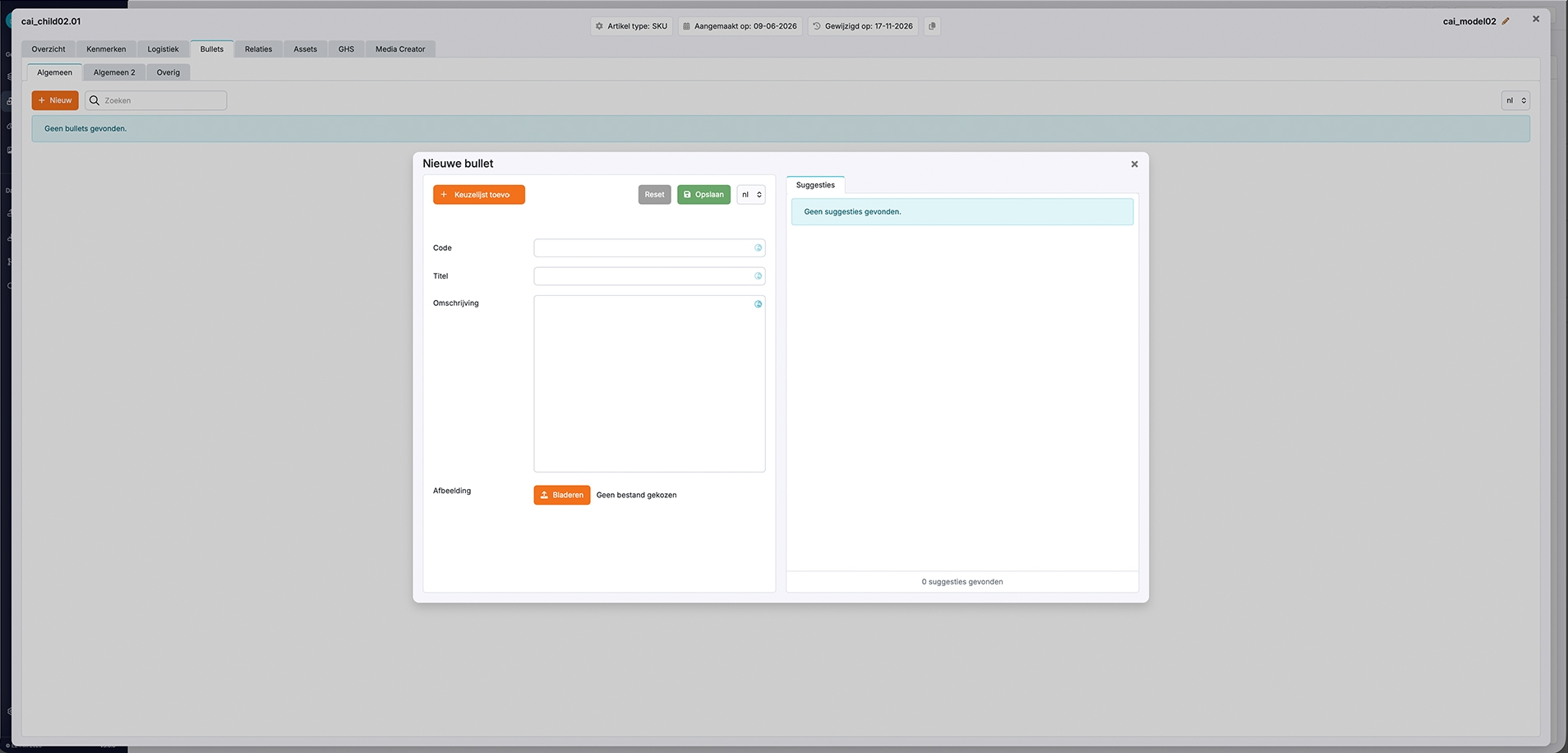
For example, instead of maintaining a simple list of product Unique Selling Points (USP), you can create richer product highlights that combine a heading, supporting description and relevant image. The structured information can then be managed centrally and used for different product communication needs.
Configure different fields for different bullet categories
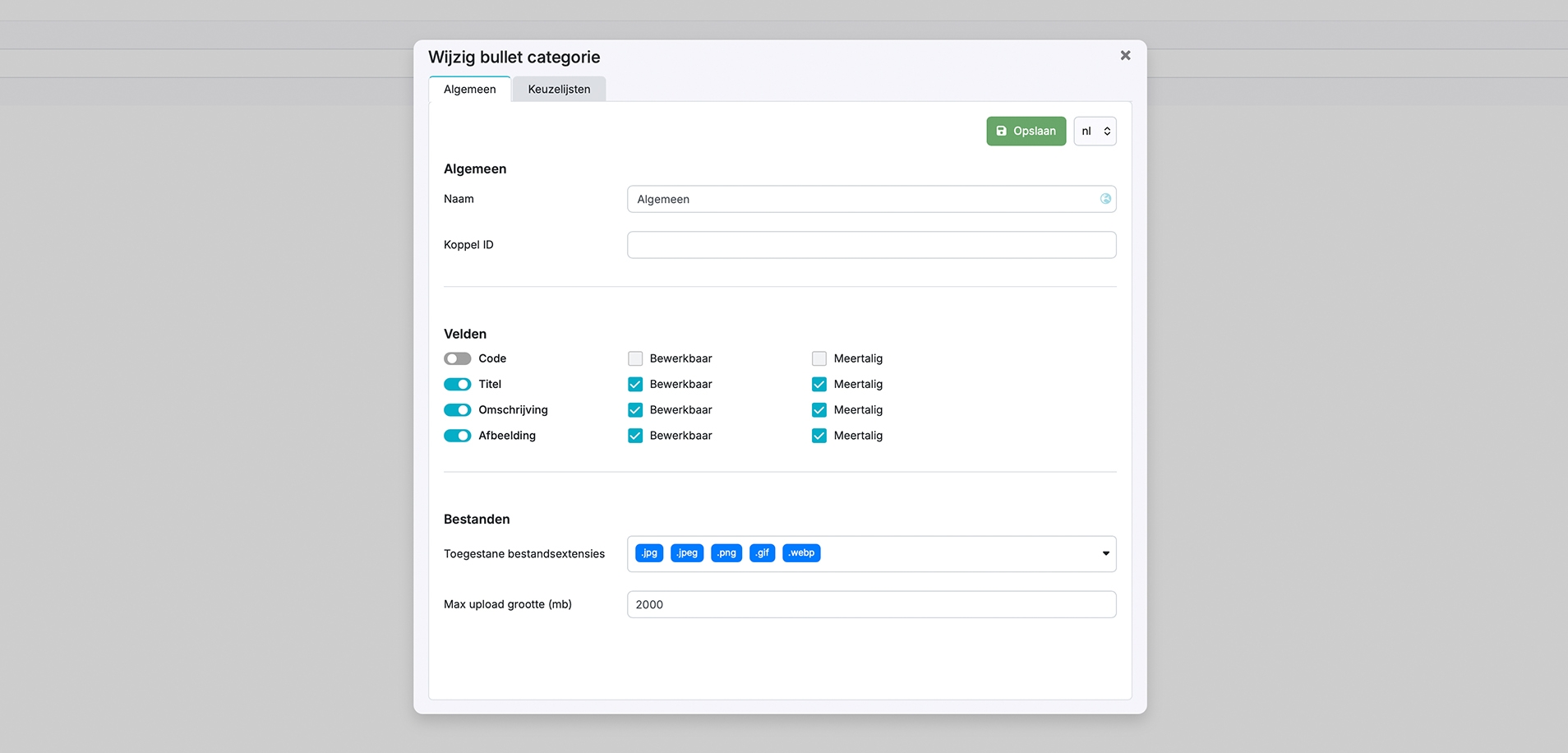
Not every type of product bullet needs the same information. A simple list of selling points might only require a title, while a more detailed product feature could benefit from an additional description and image such as icon or symbol.
That's why Pimmix now allows you to configure which fields are available for each bullet category. When users create or edit bullets, they only see the fields configured for the selected category. This makes it possible to build different content structures for different purposes while keeping data entry straightforward.
For example:
-
Key selling points: Title only.
-
Product features: Title and description.
-
Visual product highlights: Title, description and image.
-
Structured product information: Code, title and other relevant fields.
The result is greater flexibility in how product content is structured, without adding unnecessary fields to every bullet.
Asset management – Import files at cluster level
More efficient asset management for product groups and variants
Previously, asset imports were limited to individual articles or SKUs. This meant that files associated with an entire product group or family had to be linked separately to individual articles.
We've expanded the asset importing functionality to support importing and linking files directly at cluster level. With the new functionality, you can import assets directly into a cluster. This is particularly useful for product families where several articles share the same documentation or other materials.
For example, a product family containing multiple sizes or variations might share a common installation manual, technical document or product image. Instead of managing these shared materials separately for every SKU, you can now associate them with the relevant cluster. This provides more flexibility when organizing product assets and can significantly reduce repetitive work when managing larger product assortments.
Classification matrix – Improved performance for large product assortments
Faster loading and smoother handling of large matrices
Working with extensive product assortments often means dealing with large amounts of product information, classifications and technical attributes. We've introduced several performance improvements to the Pimmix classification matrix, particularly when opening and working with larger overviews.
The optimizations are designed to reduce loading times and improve responsiveness when managing classifications containing many linked articles and attributes. This can make a noticeable difference for companies maintaining extensive product assortments or detailed technical product specifications.
Whether you're reviewing information, identifying missing attributes or managing product data across multiple articles, working with large matrices should now be faster and more reliable.
AI – More efficient bulk processing of product data
Improved AI processing for large classifications
Pimmix allows you to use AI to generate, enrich, translate and transform product information directly within your product data management workflows.
With version 3.1, we've optimized bulk AI processing in the classification matrix.
Previously, applying AI operations to classifications containing hundreds or thousands of articles could require considerable processing time and occasionally cause difficulties.
The improved functionality handles these larger processing tasks more efficiently, making it easier to apply AI operations across extensive groups of articles.
What does this mean in practice?
Instead of processing product information one article at a time, you can apply AI-assisted operations to larger selections within a classification.
Depending on your configured AI instructions and workflows, this can help with activities such as:
-
Generating and improving product descriptions.
-
Translating product information into different languages.
-
Standardizing information.
-
Reformatting existing content according to defined instructions.
Combined with the classification matrix, these improvements make AI-assisted product data enrichment more practical for larger assortments.
Article management – Small improvements that make a big difference
We've also introduced several improvements to article overviews and bulk editing to make everyday product data management easier.
Select multiple articles using CTRL
Selecting multiple articles is now more convenient.
You can hold down the CTRL key and drag your mouse across articles to select several items at once.
This provides a quicker way to build article selections, particularly when working with larger overviews or preparing bulk operations.
Choose how many articles are displayed per page
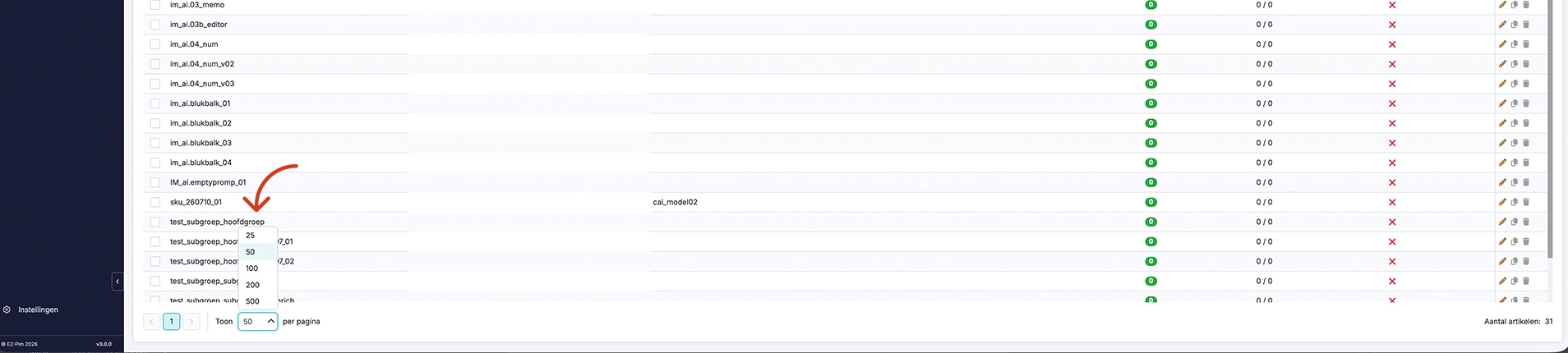
You can now configure the number of articles displayed on each page of an article overview.
For example, if you regularly work with extensive product lists, you can choose to display more articles without constantly navigating between pages.
Pimmix also remembers your most recently selected setting, so you don't need to adjust it again every time you return to an overview.
It's a small improvement that can make navigating large product assortments considerably more convenient.
Open and edit individual articles without leaving bulk editing
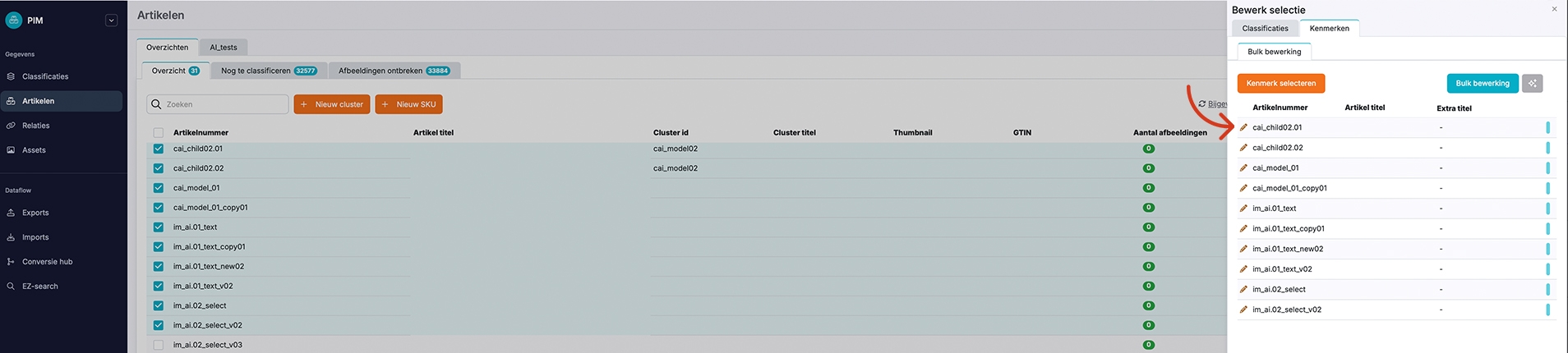
We've made it easier to work with individual articles while using bulk editing.
A new edit icon is now available next to articles in bulk editing mode.
Clicking this icon opens the selected article in a pop-up window, allowing you to review or modify its information without leaving the bulk editing environment.
Once you've finished, you can return directly to your previous workspace and continue working with the original article selection.
This is especially helpful when you notice something that needs attention while reviewing or updating a larger selection of products.
Instead of interrupting the workflow and navigating to a separate article page, you can make the necessary changes and continue where you left off.
Price management – Improved mapping and sending workflows
We've made several improvements to the price management functionality to provide a clearer and more consistent working experience.
A clearer price mapping interface
The price mapping interface has received both visual and functional improvements.
The updated design makes the interface easier to navigate and helps users work more efficiently when configuring how price information is mapped between different data structures.
These improvements are particularly relevant when working with price lists from different suppliers or preparing price information for further processing.
Improvements to price sending
We've also refined the price sending interface. Several visual adjustments and bug fixes have been introduced to improve usability and make the sending workflow smoother.
Together, these changes help make the price management process more straightforward and reliable.
General improvements – Account settings within easy reach
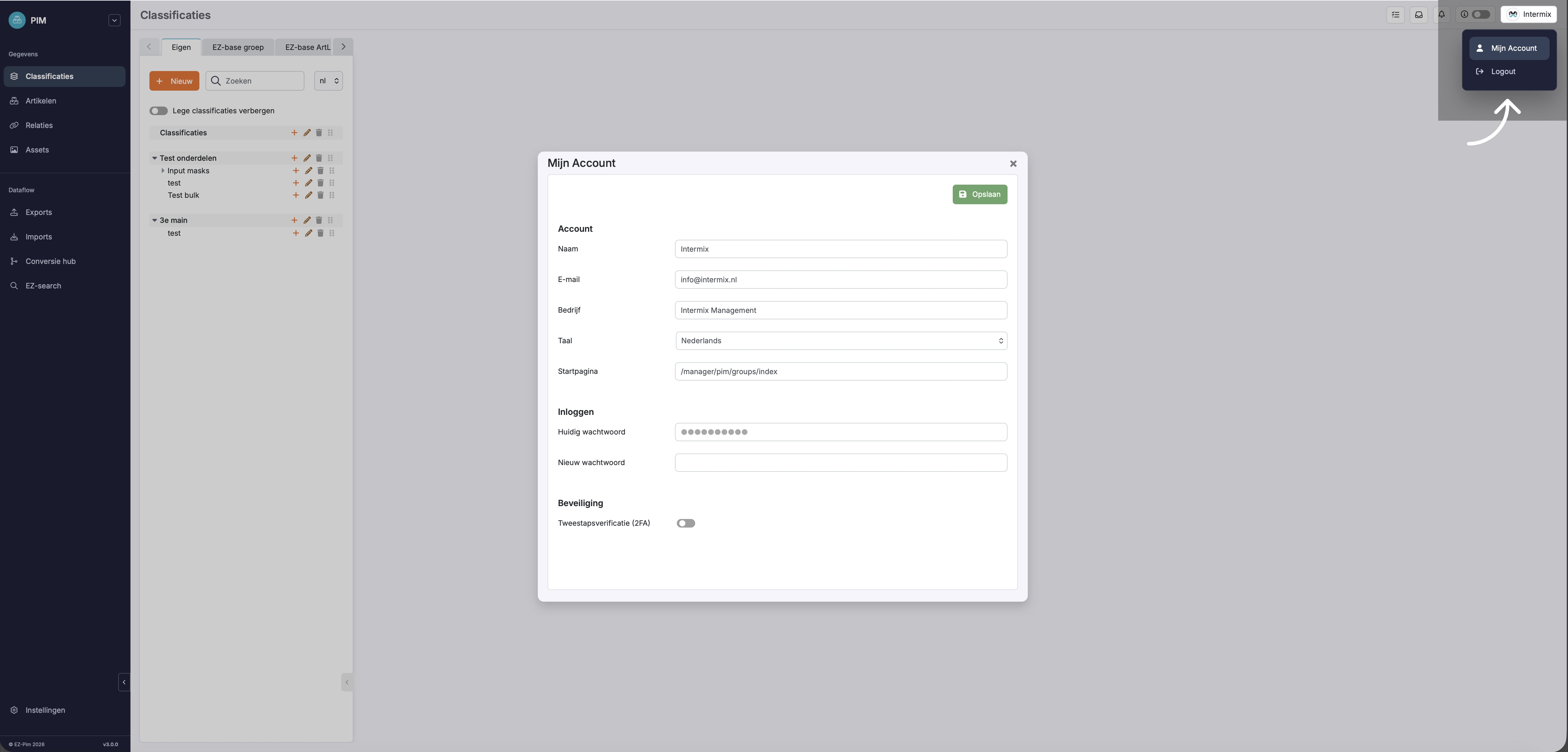
Access your account settings from anywhere in Pimmix
Your personal account settings are now always accessible through the menu in the top-right corner of Pimmix. The My Account section provides convenient access to your personal account details and settings, including two-factor authentication (2FA).
This makes it easier to manage your personal settings and security preferences without having to search for the relevant page.
Additional fixes and improvements
Alongside the new functionality described above, Pimmix 3.1 includes several additional bug fixes, technical improvements and refinements across the platform.
These changes are part of our ongoing efforts to improve the reliability, performance and everyday usability of Pimmix.
For a more detailed overview of individual fixes and technical changes, you can check the update information directly within your Pimmix environment.
Smarter work, smoother days
From more flexible product content and improved logistics management to faster AI processing and more efficient everyday workflows, Pimmix 3.1 is another step toward making product data management simpler and more effective.
Our goal remains the same: help you spend less time managing product information and more time putting it to work.
Want to learn more about these improvements or explore how they could support your product data processes?
Get in touch with our team. We'd be happy to help you discover the possibilities.
PLEASE NOTE: Some features may require additional configuration or activation and may not be immediately available in every Pimmix environment. Certain capabilities may involve additional charges depending on your subscription and requirements.